Writing C++ Application For Versant
In this write up we shall see what does it take to develop applications using Versant’s Object Oriented Database. I have been involved in developing and debugging applications with Versant as the database for bit over an year and this write up is just a recap of the kind of work I have been doing with Versant using its C++ libraries. There are options to use other languages like Java, but I’ve used C++.
NOTE: This write up is only contains the approach with brief reference to its C++ API classes. It does not describe the C++ API in detail. For that you would need to get your hands on the Versant Usage Manual and Versant Reference Manual for C++.
Definitions
Firstly what is an Object Oriented database ?
Object Oriented database (a.k.a Object database) allows its user to represent information as Objects. The schema is created as a set of classes and the instances of the class are persisted into the database and are called objects. The advantage of using an Object database is its easy to represent classes you have designed into the database directly. You could use all the advantages of object oriented(-ness) for your database objects. You could design base classes and derive classes with more special functionality. And invoke virtual methods on the base-class (after loading them from the database) which could invoke a derived class functions. And use complex object composition to represent one object holding other objects.
http://en.wikipedia.org/wiki/Object_database
Some Basics of Versant
Before we begin developing applications we need to be aware of some concepts, classes, tools, and procedures that Versant provides its users/developers.
Concepts
Once you have your persistent classes ready (we will see how to get these classes later). You could stream the schema into the database. And then populate them with data (object instances).
Query Language
All queries to the versant database are written in a propreitary query language called VQL (Versant Query Language). You could refer to the reference manual to learn about this.
Internal Representation
Each object is uniquely identified by OID (Object Identifier). An OID is a numeric string that takes the form of “dd.nn.nnnn” where dd, nn and nnnn are integers. Example –
1.0.4941,
32.36.43204 … etc.
Concept of Transaction and Writes
When modifying the object instances in the database using the APIs, we could begin a transaction and start modifying the data, each of the data we modify we mark it as dirty. And at the end if the transaction is committed only that data which was marked dirty actually gets written to the database.
Templates and Prerequisites
Many of the Versant’s C++ API classes makes extensive use of Templates (parameterized classes). If you are not familiar with C++ templates you could just do a quick read up on the basics of it. As we would only use the already provided template classes it shouldn’t be that hard.
Types of Objects
Objects in versant can be
- Persistent — those ones which were / can be saved to the database.
- Transient — those which only reside in memory.
- Versioned Objects — Objects could be versioned. You could have a persistent object and create newer versioned objects based on the base/parent object. You could have a version tree of the objects.
What Versant Persistent Classes can Encapsulate?
Versant Persistent classes can encapsulate the portable data types that are shown below and other persistent classes, collection classes. However it cannot encapsulate enums, unions, and C style pointers or C++ references. If you want to indicate you want to refer to another class as a link, then you should use Link
Important Versant Classes
PObject: Is the base-most class. For any persistent Versant Object. This has methods –acquirelock— acquire a lock on itself,as— method to down-cast to a more specific derived classoperator new— Creates a new persistent object for any sub-type. There are some helper macros for this like – O_NEW_PERSISTENTdelete— delete itself from memory and database based on the type of object it is (destructor is called).releaseobj— release the object from memory.
PVirtual(inherits fromPObject) : This class has methods for hashing and searching.VDate,VTime– Represent date and timeVString– Represent strings.VCollection– Template class representing base of various collections. Some of the popular collection classes are –VEArray<T> VEList<T> VIList<T> VESet<T> VISet<T> VEDictionary<K,V> VIDictionary<K,V>etc. These are all template classes.PDOM– This is an important class that you would use quite often in programming. PDOM has methods that perform database operations such as –- beginsession (i.e. begin a transaction)
- abort (abort transaction)
- commit()
- connectdb()
- createdb() and many many more…
VSession(extends PDOM) – This class has all the useful methods that operate on the database. PDOM is on the deprecation list and VSession will take its place.- PClass / PClassObject
– To operate on Class (i.e. OODBMs Table equivalent), you could use these classes PClass and PClassObject. These classes contains methods like – - createIndex – create various types of Indexes
- dropIndex – delete the index on the class.
- select – equivalent to SELECT query. To query data. It uses PPredicate class which is used to specify conditions.
- PClassObject
– is just a templatized wrapper over PClass. It has some methods to extract the PClass’s object pointer, reference etc. You can call all PClass methods and it would be directed to the PClass it wraps around. - Link Classes (Link
) – Link is like a persistent pointer. It is represented by the OID (Object Identifier discussed above). There many kinds of Link variants available – - Link
– Link to the particular “type” (or subtype ofcourse). - LinkAny – Link to any type (like a
void*). - LinkVstr
– Represents a collection of links to type (array of pointers of type). - LinkVstrAny – Represents a collection of links to any type (like an array of
void*).
These have many helper methods (operator->, operator*, operator== etc.) to convert them to c-style pointers/addresses while writing code. They also have methods to check if the link is NULL, set it to NULL etc. You could invoke many of the PObjects methods aswell.
- Vstr classes – These unlike the LinkVstr types store the actual objects. The types are Vstr
, VstrAny. - VString/PString – Represents strings. Many functions similar to std strings. This cannot be used as a independed / standalone persistent class by itself. But can be used as an attribute (i.e. like the column of a table) of the class. There are helper overrides that easily convert to and from
char*.
Container (extends PObect) Class – This class allows its user to operate on a set of heterogeneous objects. If I understand right, a container is more like a view in the RDBMS world but a bit different in the following ways –
- This allows user to operate on a set of objects at once. Retrivals are faster.
- User can put locks on the entire container thus locking all the objects in the container.
- Write the container’s contents to the database (provided no one else has obtained locks on the objects).
Container classes needs to have a unique name in the database.
Some of the methods a container has are – add(), remove(), read(), write(), load() etc.
Collection Classes – Like discussed above, collection classes fall under the category of Array, List, Set and Dictionary. There is a separate iterator (V{collectiontype}Iterator for e.g. VIDictionaryIterator) class available to iterate over the collection. Each of the collections have classes like VEArray, VIArray, and VVArray (similarly dictionary and list and set).
- E -> Content of the collection is an element (VElemental)
- I -> Content of the collection is a identity (i.e. Link)
- V -> Content of the collection is a Value (by value).
So comparisions are done on each of these types.
Versant Portable Datatypes / Type definitions
o_1b <–> char (1 byte)
o_2b <–> short (2 bytes)
o_4b <–> int (4 bytes)
o_float, o_double,
o_date, o_time, o_timestamp
There are some unsigned versions for the above mentioned types. Refer to the manual for details.
The notes so far gives us a fair idea of the classes that are involved for developing applications using Versant as the DB.
Now lets get a birds eye view of the steps involved in writing code, compiling them, generating schema, etc. So we will see the complete cycle for developing the application –
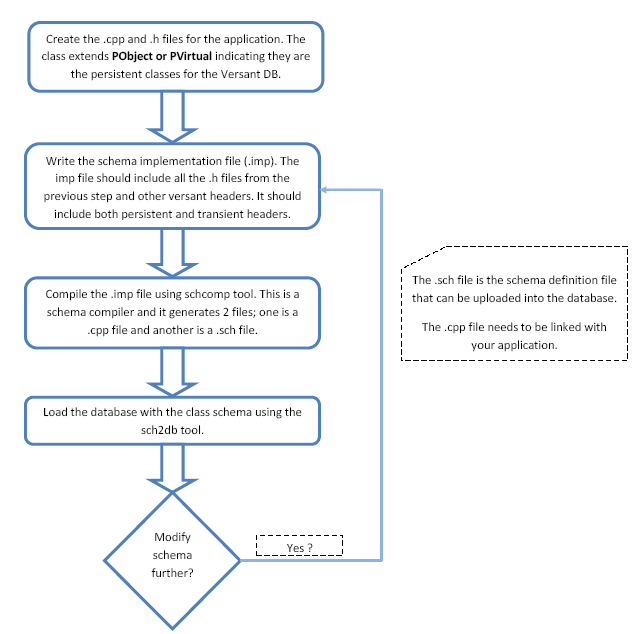
Now lets perform the steps mentioned in the flowchart above with a small example. We will see how do we write the C++ code, compile it, generate schema and finally create a database and upload the schema to the database.
Lets consider “Employee” to be the entity of our discussion –
I would follow the convention of naming persistent classes suffixed with a _p. So our employee entity would be Employee_p.
Lets say Employee_p fields are –
id – Employee id
name – Employee name
address – Employee address
joining_date – Employee joining date
Lets begin by writing the C++ code for the persistent class.
Employee_p.h
#ifndef _EMPLOYEE_P_H_
#define _EMPLOYEE_P_H_

#include <cxxcls/pobject.h>
#include <cxxcls/vtime.h>

class Employee_p : public PObject
{
	public:
		Employee_p();
		Employee_p(Employee_p&);

		virtual ~Employee_p();

		static LinkVstr<Employee_p> find();
		static LinkVstr<Employee_p> find(const o_4b empid);

		o_4b id;
		PString name;
		PString address;
		VTime joining_date;
		O_TS_TIMESTAMP;
};

#endif // _EMPLOYEE_P_H_
Employee_p.cpp
#include “Employee_p.h”

Employee_p::Employee_p() {
	VPP_CLASS_CONSTRUCTOR1(Employee_p);
}

Employee_p::Employee_p(Employee_p&) {
	VPP_CLASS_CONSTRUCTOR1(Employee_p);
}

Employee_p::~Employee_p() {}

LinkVstr<Employee_p> Employee_p::find() {
	return PClassObject<Employee_p>::Object().select(NULL, FALSE, NULL_PREDICATE);
}

LinkVstr<Employee_p> Employee_p::find(const o_4b empid) {
	returnPClassObject<Employee_p>::Object().select(NULL, FALSE,
	PPredicate(PAttribute(“Employee_p::id”) == empid));
}
Now lets create a database so that we could upload the generated schema –
$ makedb -g -logging -locking -promptpasswd testdb
Now create an entry in the osc-db file for the database testdb
$ dbid -c -t2 testdb
The above command would prompt you for the DBA password which you could set. And create a database.
oscp — command prints versant db configuration paths, etc.
Next we write the schema file –
Schema.imp
#include “Employee_p.h”

O_CAPTURE_SCHEMA ( Employee_p );
Now compile the schema file using the ‘schcomp’ file as follows –
$ schcomp -I`oscp -d`/h Schema.imp
The above command would generate the following files –
schema.sch – This would be uploaded into the database. schema.cxx – This would be linked with your application. To upload the schema.sch into the database testdb use the following command –
$ sch2db -y -D testdb schema.sch
The above command would upload the class/entity into the database. You could use the object inspector to view the classes.
Some of the frequently used commands in versant –
Create a database
$ makedb -p -logging -locking -promptpasswd
-p : Personal database
-logging : Enable logging
-locking : Enable locking
-promptpasswd : Prompt for DBA password
<DatabaseName> : Name of your database.
Database configurations can be changed by altering the contents of profile.be file.
Remove/Delete a database
$ removedb -f -rmdir <DatabaseName>
-f : Force remove
-rmdir : Remove its associated files on the disk.
<DatabaseName> : Name of your database.
Start a database instance
$ startdb <DatabaseName>
Stop a database instance
$ stopdb -f <DatabaseName>
-f : forcefully shutdown the database
Backup or Restore a database
$ vbackup -dev <path_to_backup_file_name> -backup <DatabaseName>
The above command will backup the database specified to the <path_to_backup_file_name> specified.
$ vbackup -dev <path_to_backup_filename> -restore <DatabaseName> -rename <DifferentRestoreName>
The above command restores the database from the backup file into DifferentRestoreName. If rename is not specified then it restores it under the name it was backed-up.